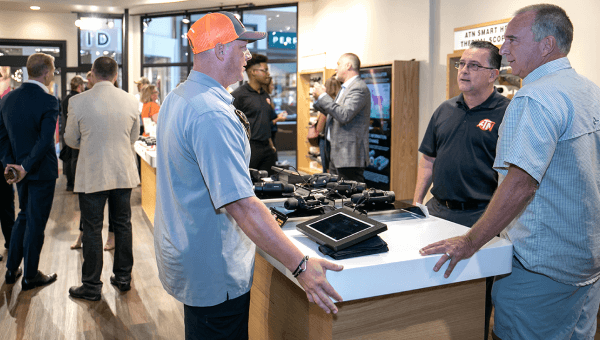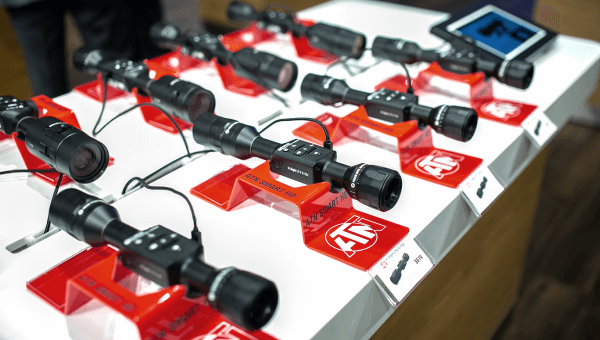
The question I get most often: does SharpIR AI actually change what you see, or is it a label on a menu toggle? It changes what you see, and it does one specific job. SharpIR AI is ATN’s proprietary processing stage that uses AI-driven algorithms to enhance image sharpness and clarity in real time, improving edge definition and target contrast so heat signatures stay readable in cluttered or low-visibility scenes. The same spec sheet lists a ≤15mK NETD sensor and a 50 Hz refresh rate beside it. Those are different links in the chain, and confusing them is how people buy the wrong optic.
What is SharpIR AI?
SharpIR AI is a real-time image processing layer sitting between the thermal sensor and the display. It is not a sensor, not a lens coating, not a recording mode. On a 6th generation ATN device it appears as a toggle in the Thermal menu next to Brightness, Contrast, Sharpness, Forest Mode and Palette — which tells you what family it belongs to. It processes frames the detector has already produced, continuously, live.
How does SharpIR AI work in the signal chain?
SharpIR AI is stage four of five. Here is the full path on the ATN ThOR 6 640x512 | 2-16x:
- The germanium lens collects long-wave infrared. Glass blocks thermal radiation, so the objective is a 35 mm germanium element at F/1.0. Germanium is transparent in the thermal band, and the fast aperture puts more radiation on each pixel. This sets the floor for everything downstream.
- The uncooled microbolometer turns heat into resistance. A 12μm VOx uncooled focal plane array at 640×512. Each 12-micron pixel is a vanadium-oxide bridge whose resistance changes as infrared energy warms it — no cryocooler, no spin-up.
- Correction makes the raw array usable. Every microbolometer drifts and every array has defective pixels. Non-Uniformity Correction and Pixel Correction handle that. This is repair, not enhancement.
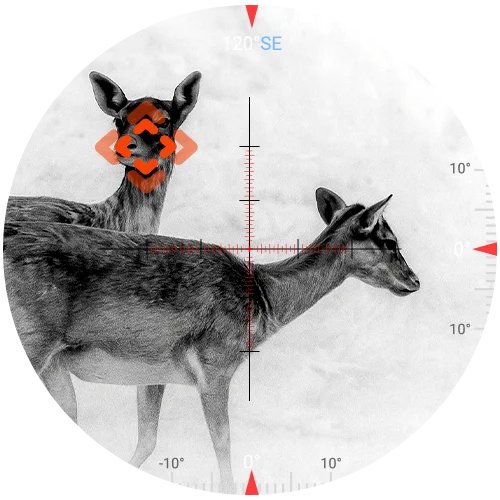
- SharpIR AI processes the corrected frame. The picture is now geometrically honest but visually flat. SharpIR AI refines edge definition and target contrast so a shape reads as an animal rather than a warm smudge.
- The display renders it. A 0.49-inch, 1920×1080 OLED shows the result at the sensor’s 50 Hz refresh rate.
Why real-time processing beats a pretty still frame
The 50 Hz refresh rate is why SharpIR AI has to be computationally cheap, not just clever. Anything running on live video must finish inside the frame interval — roughly 20 milliseconds — or it adds latency, and latency on a rifle is worse than a soft image, because your reticle stops tracking with your rifle.
Myth versus reality: processing adds no information
Processing cannot add information that is not present in the sensor signal. It only makes contrast that is already there legible.
- Myth: it replaces resolution. Pixel count sets how many samples land on your target. A 640×512 array gives roughly six and a half times the samples of a 256×192 array behind the same lens. SharpIR AI can sharpen the edges of a four-pixel blob; it cannot invent the forty pixels you need to identify it.
- Myth: it replaces a low NETD. NETD — Noise Equivalent Temperature Difference — is the smallest temperature difference the detector can separate from its own noise. At ≤15mK that is fifteen thousandths of a degree. A difference below the noise floor never enters the signal, and no algorithm recovers it.
- Myth: more sharpening is always better. Sharpening amplifies everything in the frame, sensor noise included. That is why SharpIR AI is a discrete function, not a slider pushed to maximum.
Read a spec sheet in that order: lens, sensor resolution, NETD, then processing. Processing multiplies the front three. It never substitutes for them.
SharpIR AI versus NUC and pixel correction
These three get grouped together because they all live in software. They solve unrelated problems.
| Function | Problem it solves | How often it runs |
|---|---|---|
| NUC (Auto / Semi Auto / Manual) | Thermal drift and uneven response across the array — a washed-out, cloudy image | Periodically, or on demand |
| Pixel Correction | Dead, hot or stuck pixels showing as fixed dots | Rarely, as maintenance |
| SharpIR AI | Weak edge definition and target contrast in a technically correct image | Continuously, in real time |
Practical consequence: a foggy, uniform image is a NUC problem, and SharpIR AI will not fix it. A clean image where the target reads as a shapeless patch against warm brush is what SharpIR AI addresses.
The other Gen 6 processing modes
SharpIR AI is one item in a menu. Knowing the rest stops you reaching for the wrong control when the image disappoints.
- Forest Mode — optimizes the image for dense foliage, emphasizing heat-emitting targets so detail survives heavy vegetation. Scene-specific, where SharpIR AI is scene-agnostic.
- Hot Point Tracking — marks the hottest object in the field of view. A detection aid drawn over the image, not an enhancement of it.
- Brightness, Contrast, Sharpness — manual tone controls. Contrast sets the difference between warm and cold areas; Sharpness sets edge clarity. Your knobs; SharpIR AI is adaptive.
- Six palettes — White Hot, Black Hot, Iron Red, Alarm, Green Hot, Sepia. A palette remaps existing values to different colors and changes nothing in the data.
- Wide Dynamic Range and DeFog — on the Binox-6 Dual, WDR balances detail across hot and cold regions of one frame, while DeFog raises contrast when fog, mist or thermal bloom cut visibility.
Which ATN devices run SharpIR AI
SharpIR AI ships across the 6th generation platform, always on a 12μm VOx uncooled focal plane array at 50 Hz. What changes is the sensor underneath.
| Device | Sensor | NETD | Detection range |
|---|---|---|---|
| ATN ThOR 6 640x512 | 2-16x | 640×512 | ≤15mK | 3100 m |
| ATN Binox-6 Dual 640x512 | 640×512 | ≤15mK | 3100 m |
| ATN TICO 6 640x512 clip-on | 640×512 | ≤18mK | 3500 m |
| ATN ThOR 6 Mini 640x512 | 2-16x | 640×512 | ≤18mK | 3000 m |
| ATN BlazeTrek 6 640x512 | 1.5-12x | 640×512 | ≤18mK | 1000 m |
| BlazeSeeker Gen 6 (207) | 256×192 | ≤20mK | 345 m |
The table makes the earlier point for me: identical processing over 256×192 at ≤20mK does not produce the picture you get from 640×512 at ≤15mK. Shopping the top of the range, the 640 thermal scope lineup is where those differences show up.
What to look for before buying
- Set your identification distance first. Detection means something warm is there; identification means you know what it is. That needs pixels on target, and sensor resolution decides it.
- Check NETD against your climate. Humid air, light fog and damp vegetation compress thermal contrast. A ≤15mK rating buys margin that ≤20mK does not.
- Match the lens to the terrain. A 35 mm germanium F/1.0 objective on 640×512 yields a 12.52° × 9.41° field of view. Longer lenses reach farther and see less at once.
- Then read the processing list. SharpIR AI and Hot Point Tracking are why a good sensor feels good to use — not a way to buy a smaller one.
Common mistakes with AI-enhanced thermal imaging
- Treating it as a substitute for resolution. SharpIR AI is listed next to the sensor, not instead of it.
- Never running a NUC. A drifting array looks like a bad scope. Auto handles it; Semi Auto and Manual exist when you want control.
- Stacking Sharpness at maximum on top of it. You amplify noise and lose the detail you were chasing.
- Judging image quality from a screenshot. Behavior while panning is the real test.
- Switching palettes to fix contrast. Palettes remap color; Contrast and Sharpness change legibility.
Product example: ATN ThOR 6 640x512 | 2-16x
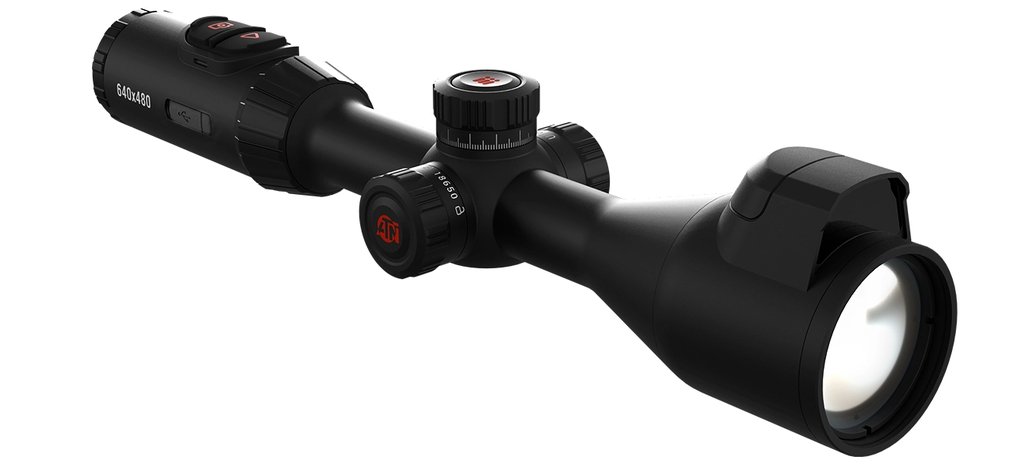
I use this configuration as the reference because the chain is strong end to end. The ATN ThOR 6 640x512 | 2-16x pairs a 640×512 12μm VOx array at ≤15mK NETD with a 35 mm germanium F/1.0 objective and a 0.49-inch 1920×1080 OLED, for a 3100 m detection range at 2-16× with 8× digital zoom. SharpIR AI, Hot Point Tracking, Picture-in-Picture, Zeroing Freeze, reticle transparency control and six palettes run on that base. The magnesium alloy housing weighs 830 g (1.83 lbs), carries IP67 and a 6000-joule recoil rating, and runs about 9 hours on one internal plus one replaceable 18650 cell. Recoil Activated Video saves 10 seconds either side of the shot to 64 GB of storage, and Wi-Fi streams to ATN Connect 6. It lists at $2,295.00. No built-in rangefinder on this model — that is an LRF-variant feature.
Is it worth paying attention to?
Yes, as a tiebreaker rather than a headline. Between two devices with the same resolution and NETD, real-time processing decides whether a target in brush reads as a shape or a smear. Between 640×512 at ≤15mK and 256×192 at ≤20mK, the sensor decides and processing does not close the gap. Buy the physics first.
Frequently asked questions
What does SharpIR AI do on an ATN thermal scope?
SharpIR AI uses AI-driven algorithms to enhance image sharpness and clarity in real time. It improves edge definition and target contrast, making heat signatures easier to identify in cluttered or low-visibility conditions. It runs continuously on the live image rather than on saved files.
Does SharpIR AI improve thermal image resolution?
No. Resolution is fixed by the sensor — 640×512 on a 12μm pixel pitch in the ThOR 6. SharpIR AI makes contrast already present in the signal more legible. It cannot create detail the detector never captured, which is why sensor choice comes first.
Is SharpIR AI the same as NUC?
No. Non-Uniformity Correction compensates for thermal drift and uneven response across the sensor array, in Auto, Semi Auto or Manual modes. SharpIR AI is enhancement applied after correction. NUC fixes a broken image; SharpIR AI sharpens a correct one.
Which ATN devices have SharpIR AI?
It ships across the 6th generation platform: the ThOR 6 and ThOR 6 Mini scopes, the TICO 6 clip-on, the Binox-6 Dual multispectral binoculars, and the BlazeTrek and BlazeSeeker Gen 6 monoculars. All of them use a 12μm VOx uncooled focal plane array at 50 Hz.
Why does NETD matter more than AI processing?
NETD is the smallest temperature difference the sensor can separate from its own noise — ≤15mK on the ThOR 6 640. Anything below that threshold never reaches the processor at all, so a lower NETD gives every later stage more to work with.
Can I turn SharpIR AI off?
Yes. On Gen 6 devices SharpIR sits in the Thermal menu beside Forest Mode, Brightness, Contrast, Sharpness and Palette, and is also reachable from the quick menu. Toggling it on the same scene is the fastest way to see what it contributes.
Where to go from here
Start from the sensor and let SharpIR AI be the reason one option feels better in the field, not the reason you picked it. Our breakdown of the current ATN thermal scope range covers how the configurations differ in practice. To compare hardware, browse the ATN thermal scope collection, or go straight to the reference used here, the ATN ThOR 6 640x512 | 2-16x.
Quick spec reference: ATN ThOR 6 640x512 | 2-16x
- SKU: TIWST6635A · Price: $2,295.00
- Detector: 12μm VOx uncooled FPA, 640×512, 50 Hz, ≤15mK NETD
- Processing: SharpIR AI, Hot Point Tracking, NUC, six palettes
- Optics: 35 mm germanium F/1.0, 12.52° × 9.41° FOV, 2-16× with 8× digital zoom
- Display and range: 0.49” OLED 1920×1080; 3100 m detection
- Build: ~9 hrs on 1 internal + 1 replaceable 18650, 830 g / 1.83 lbs, magnesium alloy, IP67